Trending events

Organising an event in the UK is exciting, but selling tickets and managing bookings can often feel overwhelming. That’s where TicketKart comes in — a smart online event ticketing platform designed to make ticketing, promotions, and check-ins effortless.
This TicketKart user guide will walk you through, step by step, how to use TicketKart to create events, sell tickets online, add promo codes, and manage attendees with ease.
🔹 Visit TicketKart.
🔹 Click Sign Up and register with your email or Google login.
🔹 Access your organiser dashboard instantly.
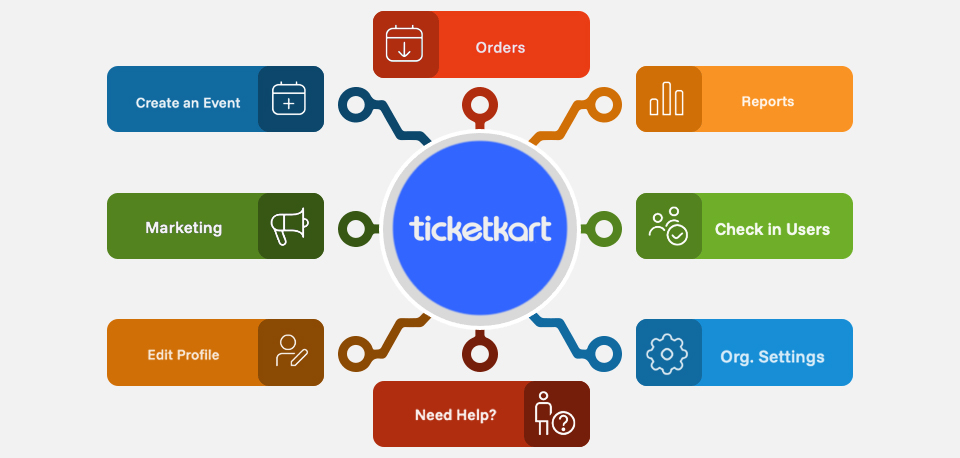
👉 The dashboard is your control hub for all event operations.
🔹 Click “Create Event”.
🔹 Add:
📌 Event Name (e.g., “London Food Festival 2025”)
📝 Description (activities, agenda, or guest list)
📍 Venue Address (with Google Maps integration) or Online Meeting Link
⏰ Date & Time (single-day or multi-day)
🔹 Upload a cover image to attract attention.
💡 Pro Tip: Use UK-specific descriptions like “London’s biggest night out” or “Manchester Business Conference” for local SEO.
🔹 Define ticket categories (General, VIP, Early Bird, Student).
🔹 Set pricing in GBP (£), ticket limits, and sales dates.
🔹 Offer group booking discounts.
✅ Your attendees get:
Instant email confirmation
Multiple payment options (Visa, MasterCard, PayPal, Apple Pay)
QR code entry
Promo codes are a great way to drive early sales in the UK market.
🔹 Go to the Promo Code section in your dashboard.
🔹 Create a code like EARLYBIRD25.
🔹 Choose discount type:
% Percentage (25% off)
💰 Fixed (£10 off)
🔹 Apply promo code to all tickets or selected categories.
🔹 Set validity dates (e.g., Early Bird till 15 Oct).
👉 Promo codes are perfect for students, group discounts, or seasonal campaigns.
🔹 Click Publish Event.
🔹 Your event will get a unique shareable link.
🔹 Promote via:
📲 Facebook & Instagram Ads (popular in the UK)
📧 Email newsletters
📢 WhatsApp & Telegram communities
💡 SEO Bonus: TicketKart event pages are SEO-friendly and visible in UK searches.
🔹 Track ticket sales, revenue, and attendee details in real time.
🔹 Download reports in Excel/CSV.
🔹 Use QR code tickets to reduce queues at the venue.
The TicketKart Check-in App makes venue management easy.
🔹 Download from Play Store/App Store.
🔹 Log in with your organiser account.
🔹 Scan attendee QR codes at entry.
🔹 Verify ticket status instantly (Valid/Invalid/Already Used).
🔹 Monitor check-ins live on your dashboard.
👉 This avoids manual paper lists and speeds up the entry process.
🔹 Access detailed sales & attendance analytics.
🔹 Measure ticket sales per category (VIP, Student, etc.).
🔹 Identify which promo codes performed best.
🔹 Export reports to plan better for your next UK event.
🔹 TicketKart supports GBP (£) and major UK payment methods.
🔹 Refund policies can be customised by the organiser.
🔹 Secure, GDPR-compliant transactions.
🔹 24/7 chat and email support.
🔹 Help centre with FAQs & user guides.
🔹 Dedicated support for high-volume UK events.
✅ Beginner-friendly interface
✅ Secure online payments in GBP
✅ Customisable promo codes & discounts
✅ QR code check-in app
✅ Real-time analytics & reporting
✅ Dedicated support for UK event organisers
With TicketKart, event organisers can:
✔️ Create events in minutes
✔️ Sell tickets online securely
✔️ Offer promo codes & discounts
✔️ Manage attendees easily
✔️ Use the Check-in App for smooth entry
✔️ Analyse event performance
👉 Ready to host your event? Visit TicketKart today and start selling tickets hassle-free!