Trending events
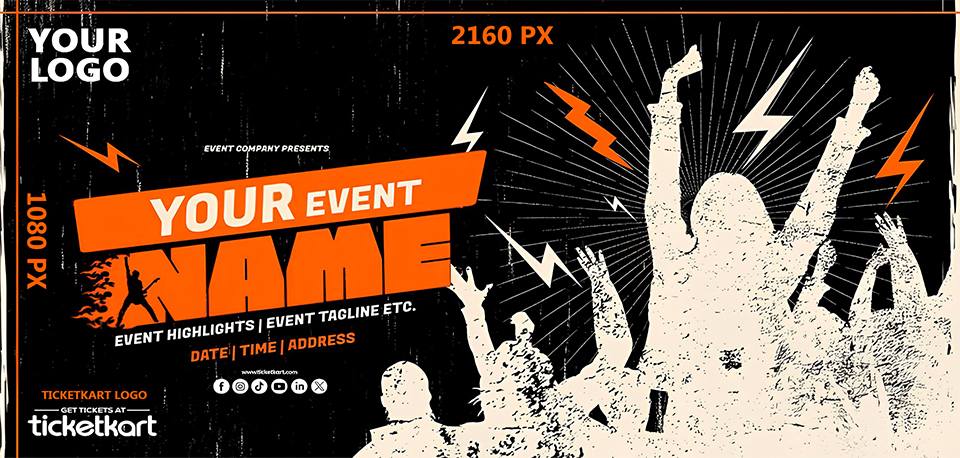
When it comes to event promotion, your event image is the first impression. It’s the visual that grabs attention on social media, draws interest on event listings, and helps convert casual browsers into paying attendees. With TicketKart, creating an impactful event image is simple — and incredibly important.
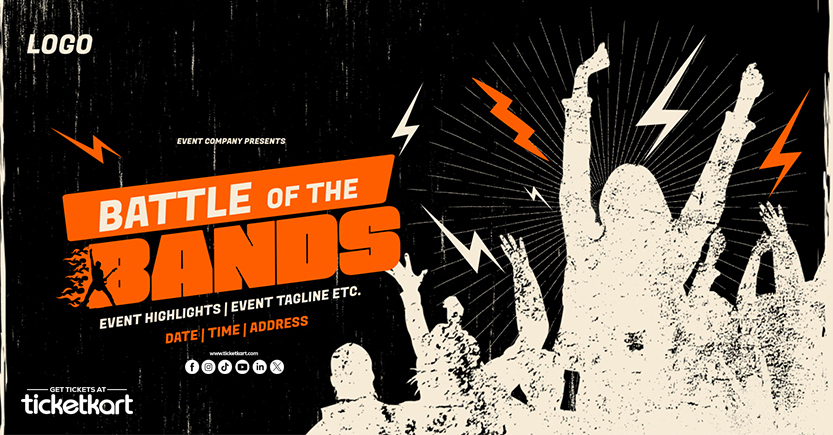
In this blog, we’ll walk you through how to design a perfect event image for your TicketKart listing, using a sample template like the one above.
In a digital world full of scrolling and swiping, you have just a few seconds to capture someone’s attention. A well-designed event image:
🌟 Highlights your event’s theme
💡 Communicates key info at a glance
📱 Looks great across mobile, web, and social platforms
🎯 Boosts your click-through and ticket sales
That’s why TicketKart supports full-sized custom event images — so you can make your event look as amazing as it feels.
To ensure your design looks perfect across all devices, here are the recommended specs for your TicketKart event image:
Size: 2160 x 1080 pixels
Ratio: 2:1 (landscape format)
Resolution: 300 DPI for sharp quality
Format: JPG or PNG
Max File Size: 10MB
Looking at the example template you provided, here are the essential elements every TicketKart event image should contain:
Make sure your event name is clearly visible. Use bold fonts and place it in a central or top area to make it the main focus. Example:
“ROCK NIGHT LIVE” or “Startup Connect 2025”
Add a short, punchy tagline that tells people what the event is about.
Examples:
“Biggest Music Night of the Year”
“Tech Talks • Networking • Live Pitches”
This is critical information. Keep it simple and visible so people can quickly know when and where it’s happening.
Example:
📅 10 July 2025 | 🕗 6 PM | 📍 The O2 Arena, London
Include your company or organizer logo at the top left or corner of the image. It adds authenticity and builds brand trust.
As shown in the template, place "Get Tickets at ticketkart" with the logo at the bottom. This drives viewers to the right platform and adds professional credibility.
Use vibrant illustrations like audiences cheering, lights, stage vibes, or design elements (like lightning bolts in the sample) to bring excitement and energy to the image.
Use contrasting colors for text and background so it’s easy to read.
Stick to 2-3 font styles to keep the design clean.
Avoid too much text — make every word count.
Use vector icons or silhouettes for a bold, modern look.
Check how it looks on mobile screens — that’s where most users will view it!
You don’t need to be a professional designer to create a stunning event image. Here are some tools you can use:
Canva – Easy drag-and-drop tool with templates
Adobe Express – Great for creatives with more control
Figma – If you're working in a team
Photoshop/Illustrator – For advanced users
Or ask TicketKart’s team for design assistance if you're stuck!
✔️ Image size: 2160x1080 px
✔️ Clear event name and tagline
✔️ Accurate date, time, location
✔️ Your logo and TicketKart branding
✔️ High resolution and readable fonts
✔️ Saved in JPG/PNG under 5MB
Once done, log into your TicketKart dashboard, go to your event, and upload the image under the "Event Media" section.
In a world driven by visuals, your event image is one of your most powerful promotional tools. It doesn’t just tell people what your event is — it shows them why they should care.
With TicketKart, you have everything you need to design, promote, and sell out your event — faster and easier than ever.
👉 Ready to launch your event?
Create it now at www.ticketkart.com and upload your eye-catching banner today!